Textos en un Canvas
Ya hemos visto que podemos crear un texto con
lienzo.create_texto(x,y, texto)
las coordenadas son, por defecto, las del centro del area imaginario
ocupada por el texto. Por ejemplo:
| Texto.py |
|---|
 1
 2
 3
 4
 5
 6
 7
 8
 9
10
11
12 | import tkinter as tk
ventana = tk.Tk()
lienzo= tk.Canvas(ventana, width=300, height=200)
lienzo.pack()
x, y = 50, 50
lienzo.create_text(x,y, text="Hola")
lienzo.create_rectangle(x-30,y-30,x+30,y+30)
ventana.mainloop()
|
Lo que muestra:
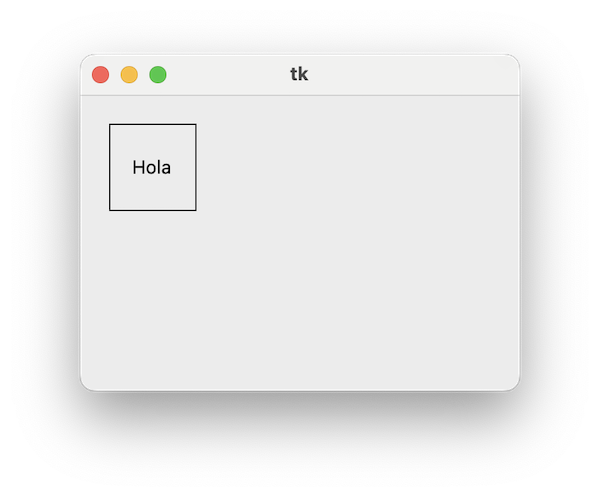
...de forma que, las coordenadas indicadas, vendrían a estar en el punto central
del recuadro.
Podemos establecer otro anclaje mediante el parámetro anchor. Por defecto
es:
lienzo.create_text(50,50, text="Hola", anchor = None )
Para que las coordenadas sean
- Centro del margen superior del texto:
anchor="n"
- Centro del margen inferior del texto:
anchor="s"
- Centro del margen derecho del texto:
anchor="e"
- Centro del margen izquierdo del texto:
anchor="w"
Los valores son las iniciales de north, south, east y west. Es la
forma en que tkinter establece los anclajes. Podemos combinar valores:
nw - esquina superior izquierdane, sw, se - resto de esquinas
Por ejemplo:
| Anclajes.py |
|---|
 1
 2
 3
 4
 5
 6
 7
 8
 9
10
11
12
13
14
15
16
17
18
19
20
21
22
23 | import tkinter as tk
ventana = tk.Tk()
lienzo= tk.Canvas(ventana, width=600, height=300)
lienzo.pack()
x = 100
y = 50
for anclaje in ["n", "s", "e", "w"]:
lienzo.create_rectangle(x-1,y-1,x+1,y+1, fill="red")
lienzo.create_text(x,y, text="Anchor "+anclaje, anchor=anclaje)
x += 100
x = 100
y = 150
for anclaje in ["ne", "se", "nw", "sw"]:
lienzo.create_rectangle(x-1,y-1,x+1,y+1, fill="red")
lienzo.create_text(x,y, text="Anchor "+anclaje, anchor=anclaje)
x += 100
ventana.mainloop()
|
Lo que muestra las coordenadas como un punto rojo:
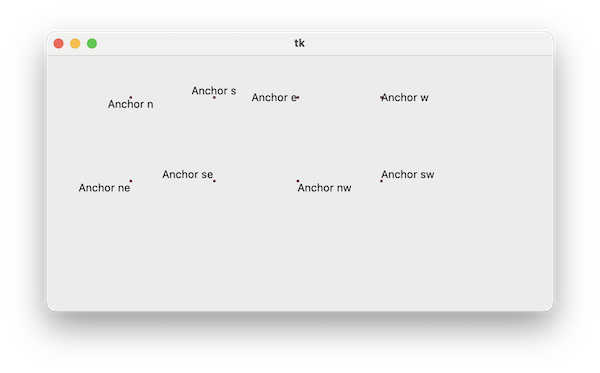
Po0r ejemplo, si queremos que las coordenadas se refieran a la esquina superior
izquierda del area ocupada por el texto, tenemos que especificar anchor="nw"
Tipo de letra
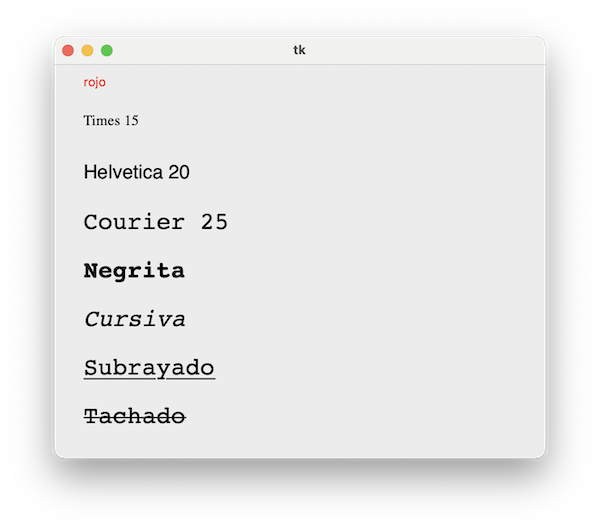
El argumento font es una tupla con tipo de letra, tamaño y modificadores
| Fuentes.py |
|---|
 1
 2
 3
 4
 5
 6
 7
 8
 9
10
11
12
13
14
15
16
17
18 | import tkinter as tk
ventana = tk.Tk()
lienzo= tk.Canvas(ventana, width=500, height=400)
lienzo.pack()
lienzo.create_text(30,10, text="rojo", anchor="nw", fill='red')
lienzo.create_text(30,50, text="Times 15", anchor="nw", font=("Times",15))
lienzo.create_text(30,100, text="Helvetica 20", anchor="nw", font=("Helvetica",20))
lienzo.create_text(30,150, text="Courier 25", anchor="nw", font=("Courier",25))
lienzo.create_text(30,200, text="Negrita", anchor="nw", font=("Courier",25,'bold'))
lienzo.create_text(30,250, text="Cursiva", anchor="nw", font=("Courier",25,'italic'))
lienzo.create_text(30,300, text="Subrayado", anchor="nw", font=("Courier",25,'underline'))
lienzo.create_text(30,350, text="Tachado", anchor="nw", font=("Courier",25,'overstrike'))
ventana.mainloop()
|